> For the complete documentation index, see [llms.txt](https://dcyf.gitbook.io/cmshandbook/llms.txt). Markdown versions of documentation pages are available by appending `.md` to page URLs; this page is available as [Markdown](https://dcyf.gitbook.io/cmshandbook/workplan/workplan.md).
# Workplan
Grantees complete workplans for each of their programs on an annual basis. The workplan consists of the *Contact & Program Info* form, the *Services & Projections* form, the *Performance Measures* form*, the Budget form, and the Agency Profile form.* Information from the workplan is integrated directly into Grant Agreements. Additionally, the information is used by DCYF to help administer and monitor grants. For example, DCYF staff refer to contact information entered in the *Contact & Program Info* form when sending out grant communications.
Workplan forms may be pre-populated with information from the original proposal submitted for the program or from the prior year’s workplan (in the case of a multi-year grant). After a workplan has been completed and submitted by a grantee, it is reviewed and approved by the Program Specialist. A workplan may undergo several rounds of changes before it is approved. Workplans must be approved by DCYF before access to invoices and activity setup is granted.
### Completing a Workplan
Completing your workplan by specified deadlines is the first step to ensuring timely processing of your Grant Agreement and access to monthly invoices and data reporting. This section describes how to complete and submit your workplan.
#### **What You’ll Need**
* Agency Account
* DCYF 2024-2029 Request for Proposals or DCYF Result Area Guides
* Your Proposal
* Doing Business with DCYF
{% stepper %}
{% step %}
**Log into CMS using an Agency Account.**
{% endstep %}
{% step %}
**Navigate into a program and click on the Workplan link in the lefthand menu.**
{% endstep %}
{% step %}
**Complete and submit the *****Contact & Program Info***** form.**
This form consists of general program information such as the program website, description, and contacts.
{% hint style="success" icon="lightbulb-exclamation-on" %}
***Contact & Program Info***** – Additional Guidance**
**Program Description.** Your program description should describe your program services, service-delivery methods (e.g., virtual/remote services, in-person, hybrid), and any relevant information that would be useful for someone unfamiliar with your program. DCYF includes grantee program descriptions in public-facing documents and other materials for department stakeholders.
**Primary Program Contact**. Grantee communications, including workplan and invoicing updates, will be sent to the Primary Program Contact listed on the *Contact & Program Info* form. Keep this information up to date to ensure you receives communications from DCYF.
{% endhint %}
{% endstep %}
{% step %}
**Complete and submit the *****Services and Projections***** form.**
This form consists of program operation dates, participant projections, target population(s), service site locations, and projected services. Refer to the DCYF 2024-2029 Request for Proposals when completing this form to ensure that your program’s services and projections align with the guidance and requirements described for the Strategy under which your program is funded. Review your program’s proposal or the *Program Dashboard* to identify your program’s DCYF Result Area, Service Area, and Strategy.
{% hint style="success" icon="lightbulb-exclamation-on" %}
***Services and Projections***** – Additional Guidance**
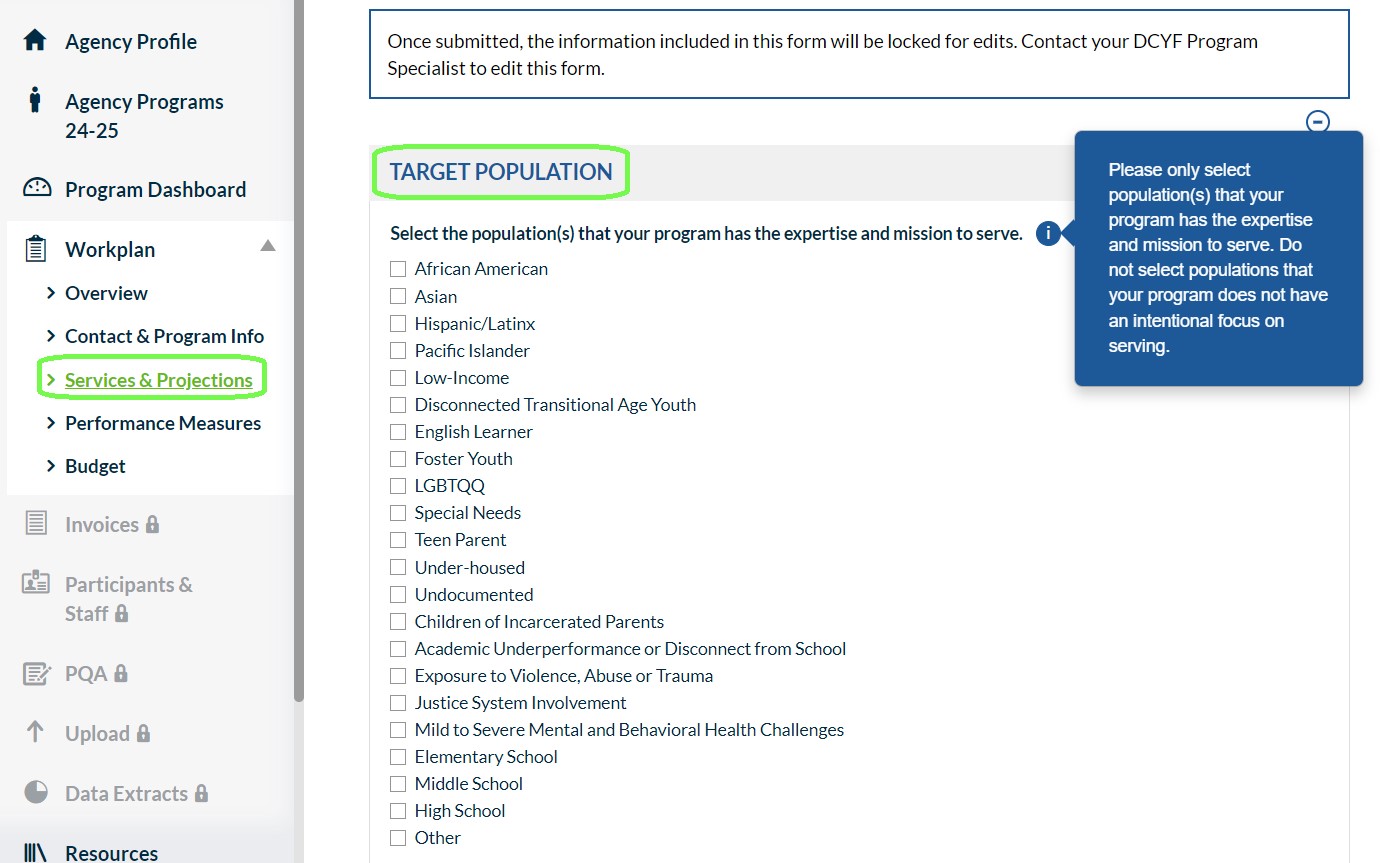
**Target Population.** Select the population(s) that your program has the expertise and mission to serve. Take the time to reflect on the population(s) that your program has an intentional focus on serving. DCYF refers to responses when responding to requests for information from department stakeholders. For example, responses have been used to respond to requests for information on programs with expertise in serving disconnected transitional age youth and youth with disabilities. Refer to the guiding questions below to support your selection.
* Location: Is your program strategically located in a specific neighborhood in San Francisco that would make your services more accessible to your target population?
* Supports: What intentional supports are provided by your program to better serve your target population(s)? Examples include, but are not limited to: language supports, specific legal services, skillsets required by your program staff to fulfill service delivery, wellness resources tailored to specific population(s).
* Outreach: Consider your programs’ outreach methods. Are your outreach methods designed to target a specific population(s)?
* Participation: Would your program be able to speak to best practices for serving specific population(s)?
{% hint style="info" %}
Target Population selections represent your program’s expertise and population(s) of focus rather than population(s) served by your program coincidentally.
{% endhint %}
{% endhint %}
{% hint style="success" icon="lightbulb-exclamation-on" %}
***Services & Projections***** - Additional Guidance**
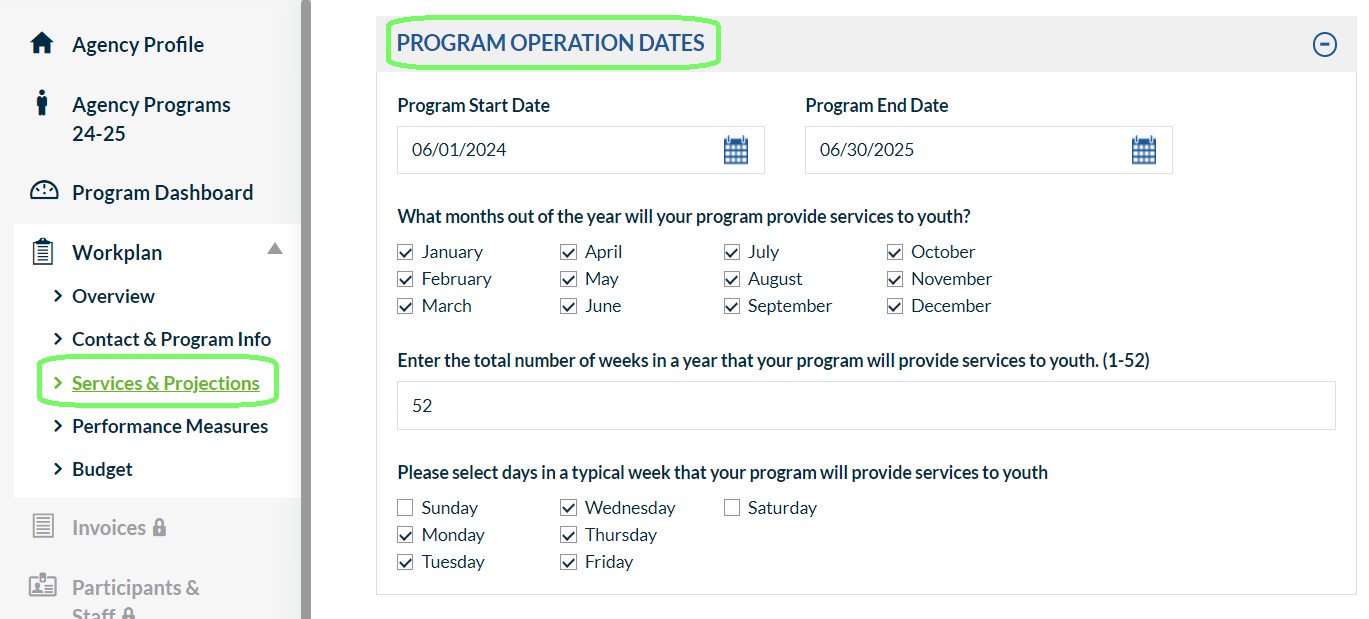
**Program Operation Dates.** The City’s fiscal year begins on July 1 and ends on June 30 the following year. Although CMS is organized by fiscal year, to simplify activity reporting for summer programming, which typically falls in two fiscal years (e.g., the activities begin in June and end in August), DCYF requires grantees that offer summer programming to report on the activities in one fiscal year in CMS—the fiscal year in which the summer ends. For example, Summer 2024 activities should be reported into FY2024-2025 in CMS, and Summer 2025 activities should be reported into FY2025-2026. The *Program Start Date* must be on or after June 1 of the calendar year in which the fiscal year begins (e.g., June 1, 2024 for FY2024-2025), and the *Program End Date* must be on or before June 30 in which the fiscal year ends (e.g., June 30, 2025 for FY2024-2025). If your program offers summer services that are funded by your DCYF grant, your Program Start Date should be the first date of summer programming, and your Program End Date should be the last date of school year programming.
{% endhint %}
{% hint style="success" icon="lightbulb-exclamation-on" %}
***Services & Projections***** - Additional Guidance**
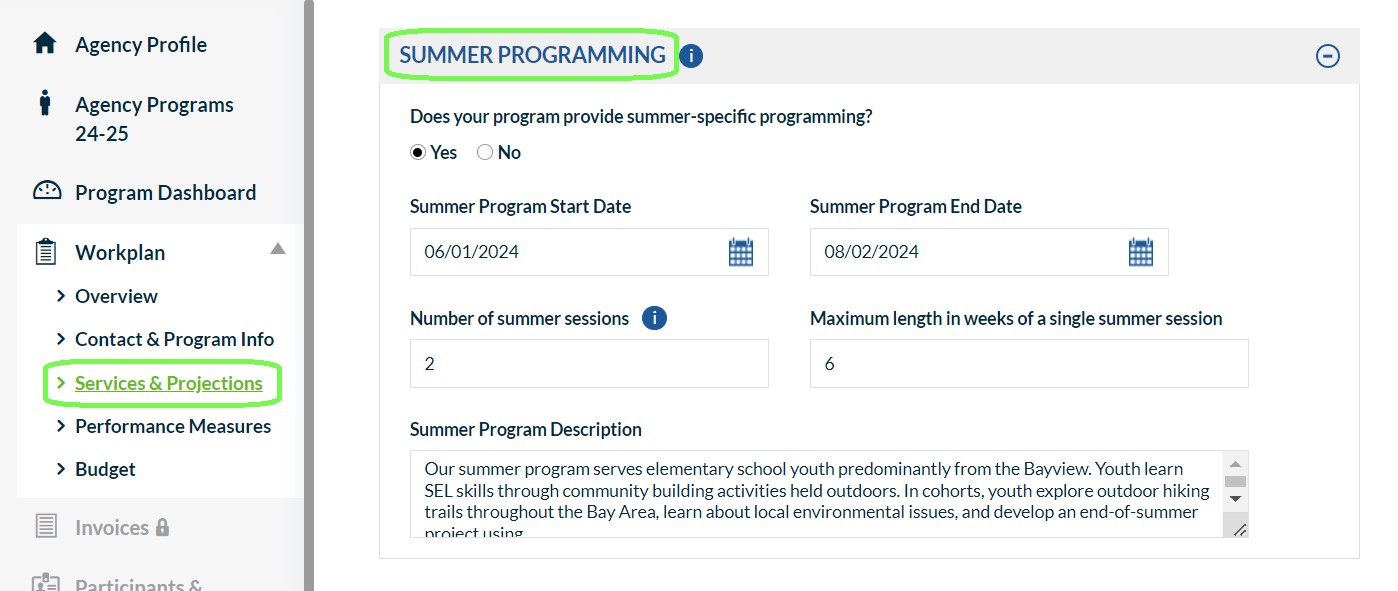
**Summer Programming.** If your program offers summer specific programming, please enter a description of your summer program, a start date, an end date, the number of summer sessions, and the length of a typical session.
{% hint style="info" %}
Summer-specific programming takes place during the summer and is different, or separate, from programming offered throughout the rest of the year. For example, summer-specific programming may have a different enrollment process, extended hours, a different curriculum, or may be offered to a cohort that starts and ends during the summer months. Programs that operate year-round and do not make any significant changes during the summer months are not considered to have summer-specific programming.
{% endhint %}
{% endhint %}
{% hint style="success" icon="lightbulb-exclamation-on" %}
***Services & Projections***** - Additional Guidance**
**Services Sites.** Closely review the program Service Site Locations and Projected Services. The *Services and Projections* form should only include site locations and services planned during the *Program Start* and *Program End Dates* listed in the *Program Operation Dates* section.
**Projected Services.** For each Projected Service, indicate a *Service Name, Service Type, Description*, and other service implementation details. Review the *Service Sites and Projected Services* section below for information on Service Types.
{% endhint %}
{% endstep %}
{% step %}
**Complete and submit the *****Performance Measures***** form.**
This form presents the performance measures applicable to your program based on the Strategy under which it is funded.
{% hint style="success" icon="lightbulb-exclamation-on" %}
***Performance Measures***** – Additional Guidance**
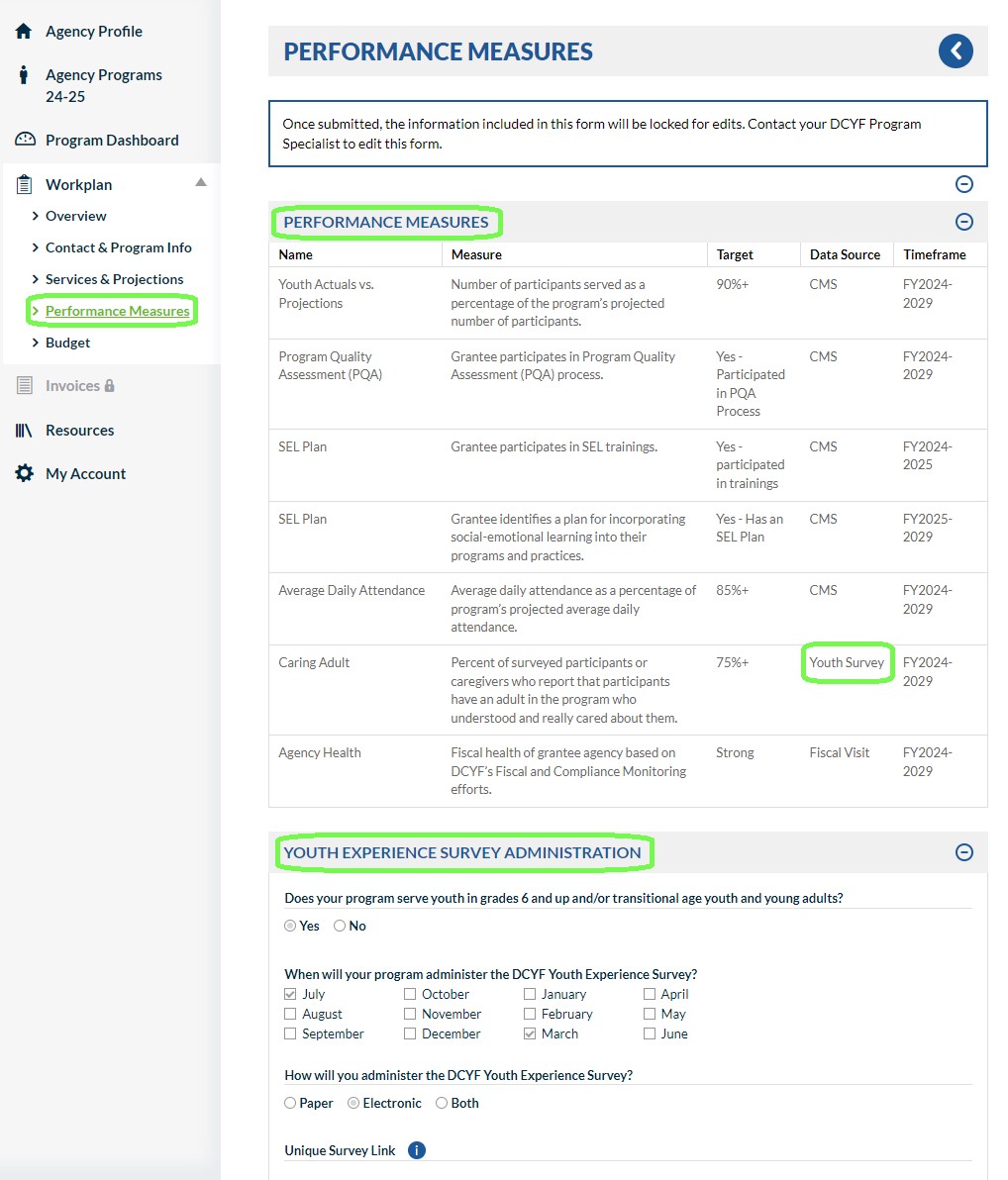
**Youth Experience Survey Administration**- If your program is required to administer the DCYF Youth Experience Survey, please indicate your proposed survey administration method (paper, electronic, or both) and timeframe for administering the survey. Youth Experience Surveys must be administered each year to participants in grades 6+ towards the end of their program experience that year. Contact your Program Specialist if you have questions about the Youth Experience Survey.
{% hint style="info" %}
The Program Primary Contact (listed in the *Contact & Program Info* form) will receive an automatic reminder email on the 1st of every month your program has selected for administering the DCYF Youth Experience Survey.
{% endhint %}
{% endhint %}
{% endstep %}
{% step %}
**Complete and submit the *****Budget***** form.**
Refer to the *Doing Business with DCYF* guide for information about the budget categories and line items included on this form.
{% endstep %}
{% step %}
**Complete and submit the *****Agency Profile***** form.**
If the *Agency Profile* has already been submitted, review the responses for accuracy. The Agency Profile form is shared across all programs listed on the *Agency Programs* page.
{% endstep %}
{% step %}
**Submit your workplan for approval by completing and submitting the *****Sign & Submit***** form.**
The *Agency Profile* and all workplan forms must be submitted before accessing the Sign & Submit form. CMS will send an email to the Primary Program Contact listed in the Contact & Program Info form confirming your submission.
{% endstep %}
{% endstepper %}
{% hint style="info" icon="chevrons-right" %}
**Next Steps**
Your DCYF Program Specialist will review your submitted Workplan. CMS will send an email to the Primary Program Contact when your DCYF Program Specialist has approved or denied the workplan submission. If your submission is not approved, review the explanation submitted by your Program Specialist by navigating to the Workplan *Overview* form. Make necessary changes and resubmit the workplan for review and approval.
{% endhint %}
{% hint style="info" %}
**Tips**
* Access workplan forms from one of two places in the CMS: the *Workplan* link in the lefthand navigation menu or the Workplan *Overview* page.
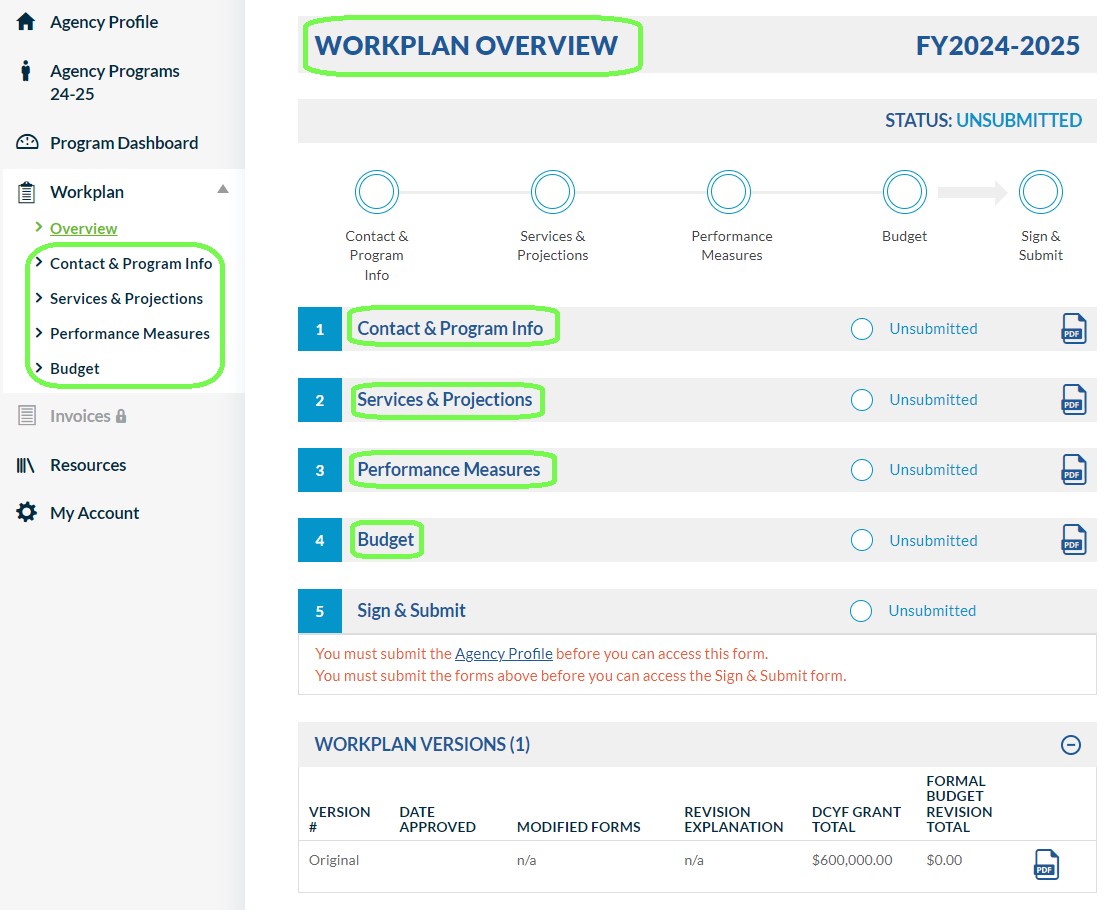
* CMS will log you out after 90 minutes of inactivity and you may lose any unsaved work! Save your progress regularly and continue later by clicking on the Save button, located at the top and righthand side of each form.
* Workplan forms that have been submitted may only be unlocked by the Program Specialist. Contact your Program Specialist if you need assistance unlocking a workplan form that has been submitted.
* Don’t risk missing important DCYF communications! Keep your Primary Program Contact up to date in the *Contact & Program Info* form. The Program Primary Contact will receive an email notification when a Workplan is submitted, approved, or unlocked for edits.
* CMS email notifications sent by Cityspan. Check your spam or junk mail for CMS notifications sent from the email domain, @*cityspan.com.*
{% endhint %}